
Knowing how to manage a baseball team means handling the season’s administrative work: registration and payments, background checks, roster upkeep, scheduling, and communication which are all separate from the actual on-field coaching duties.
For a volunteer team manager, that can look like an inbox full of Venmo screenshots, a glove compartment stacked with paper waivers, and a Google Sheet with half the roster's phone numbers missing.
Those five jobs are connected, but many teams still manage them across disconnected systems. Bringing them together makes it easier to keep the season running without bouncing between spreadsheets, payment apps, and group chats.

Move registration and payments online
Moving registration and payments onto your team website replaces the individual PayPal transactions, paper sign-up sheet, and sticky note reminding you who still owes for the season. Families fill out one form and pay online instead of having separate forms for each.
Digital waivers replace the paper liability forms every parent has to sign before opening day, and you collect them right alongside the registration form so nothing gets lost. Payment plans let families split season fees into installments instead of writing one large check, which matters when travel ball costs add up fast.
If you haven't nailed down what those costs look like, this travel baseball team budget breakdown is a good place to start. Multi-registrant discounts can automatically apply sibling rates for families registering multiple players, so you don’t have to calculate the discount manually each time.
Jersey Watch's payment processing rate is 3.5% plus $1 per transaction, so managers can decide who takes on any additional fees. Admin are able to see what registrants pay versus what the organization will collect.
Organize your roster with team tools
Jersey Watch is building tools that will let admins turn existing registrants into team rosters without maintaining a separate spreadsheet. Today, managers often pull a registration list and then rebuild it elsewhere to sort players onto the Lions, Tigers, or Bears team. The planned feature will keep that step inside the same dashboard where registration data already lives.
Once players are sorted to teams, admin can export PDF rosters to send to individual coaches and volunteers. With this new tool, admin will have three ways to build teams:
- Filtering registrants by specific criteria and bulk assign
- Assigning players manually, one at a time
- Randomizing registrants to divide them evenly across teams
Group players by registration answers
One planned team assignment method will let admin filter registrants by information collected during sign-up, like age, grade, gender, or experience, and then bulk-assign the filtered group to a team.
Say a division needs to create teams based on experience. Instead of checking answers one by one in a spreadsheet, an admin will filter by that question and review only the players who meet the requirement of beginner.
From there, the admin can confirm the group and assign those players to the appropriate team roster in one action.
The same process could be used for other registration fields. For example, an admin forming a competitive squad could filter for players who reported three or more years of experience, then bulk-assign that group without cross-referencing separate forms.
Update rosters as players join
Adding a late registrant to an existing team roster will also be a manual, one-at-a-time assignment inside the same dashboard rather than a separate re-entry process.
You know the situation: teams are already set, practices have started, and then another family signs up. Today, that can mean digging up the registration form and retyping the player's name, birth date, and contact information into a separate roster spreadsheet.
The upcoming team management feature skips that step entirely. An admin will select the new registrant inside the dashboard and assign them to the appropriate team. Because the player’s information is already on file, it carries over without being entered again.
The roster won’t update on its own when someone registers. An admin still has to select the player and assign them to a team, keeping the process deliberate and controlled.
Sync roster data with registration records
The planned team roster management tool will pull straight from the information families already submitted during registration, right inside the same dashboard where that data already lives.
Another way to sort players into rosters will be through randomized control. An administrator picks how many teams to create, clicks the button, and divides registrants evenly across them. Like the other roster tools, this will be an admin-initiated action.
These tools are still in development, so send an email to help@jerseywatch.com if you want to be one of the first to know when it is released.
Build a season schedule across divisions
A workable baseball season schedule is about coordinating shared diamonds across teams, divisions, and locations rather than planning what happens during an individual practice. If the Lions, Tigers, and Bears all share two fields, the real challenge is deciding who plays where and when.
Multi-day tournament weekends make this harder. Add regular-season games, makeup dates, and limited field availability, and a spreadsheet can get messy quickly.
Jersey Watch's scheduling tool lets admins enter divisions, game times, and locations, then generate schedules across multiple teams and fields at once. That means 10U, 12U, and 14U divisions can share the same set of diamonds without games colliding.
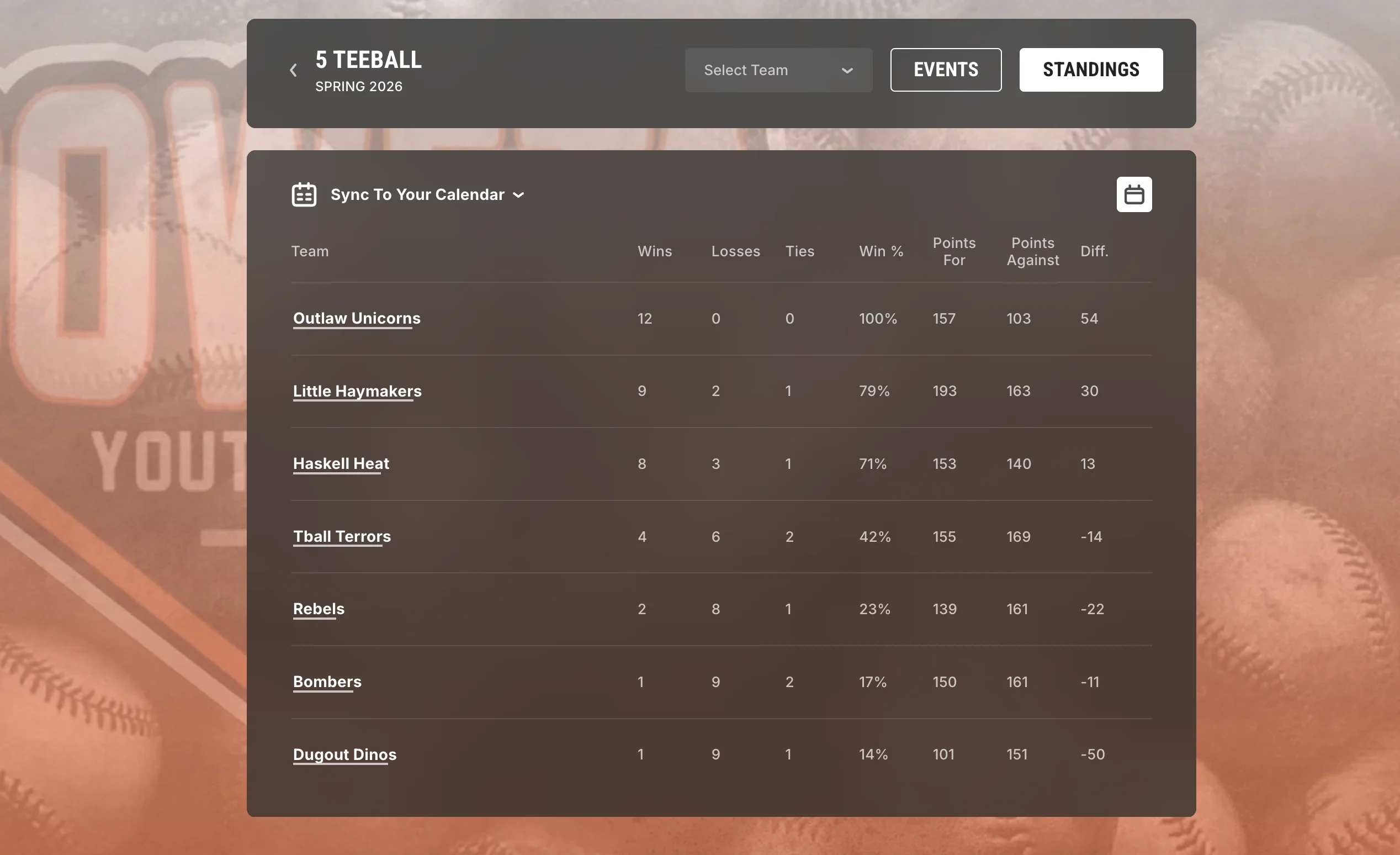
Once the schedule is built, it publishes directly to the organization's website, giving parents and coaches one place to check upcoming games. Standings also update as scores come in, so families can follow the season without waiting for separate updates.
Centralize communication with players and families
Centralized text, email, and website announcements give baseball families one reliable place to find updates instead of relying on scattered group texts, Facebook threads, and email chains.
A rainout notice posted in a Facebook group can disappear under unrelated comments within minutes. A parent who misses the post may still show up to a canceled game. That's less a communication problem than it is a channel problem.
Jersey Watch's communication tools let admins send texts and emails to a specific group instead of just everyone. A rainout notice for the 10U division, for example, can go to families affected rather than everyone in the organization.
Messages can also be scheduled in advance for registration deadlines, tournaments, or other reminders. Each message posts to the website as well, giving families a central place to check if they miss a text or email.
Recipients don't need to download an app. Updates go directly to their phone or inbox using channels they already use.
Run background checks inside your platform
Jersey Watch’s background check screening runs inside the same admin dashboard used for registration, keeping everything under the same login.
Sending an invitation to a candidate just requires admin to enter in the person's email and select who pays. Once sent, the recipient fills in their information and full results are typically available within 24 hours. Screening status appears in the dashboard, making it easier to see who's been cleared to coach or volunteer.
Background checks are also an important part of creating a safer youth sports program. The National Youth Sports Strategy recommends requiring background checks for adults interacting with youth, including coaches, officials, and volunteers. More broadly, National Children’s Alliance youth sports safety guidance emphasizes creating environments where families can feel confident that children are protected and supported.
For a volunteer-run league, keeping that process inside the same system as other admin work can make screening more consistent from season to season.
Choosing between sports-specific and generic tools
One of the clearest differences between a sports-specific platform and a generic website builder is how registration and payments work. Generic tools often require a separate form builder, invoicing tool, or payment processor. Sports-specific platforms are designed to handle both natively.
The table below shows where the two approaches typically differ so you can compare them against the way your season actually runs.
Feature | Sports-specific platform | Generic tools |
Website and schedule display | Sports templates include schedule, roster, and standings pages by default | General builders need a custom setup to display sports pages |
Registration and payments | Built-in waivers, payment plans, and multi-registrant discounts | Needs a separate payment processor and manual discount tracking |
Scheduling across divisions | Generates schedules across multiple divisions and locations at once | Calendar tools need manual entry for each game and division |
Roster organization | Rosters will pull directly from registration data, like age or grade | Rosters live in spreadsheets disconnected from sign-up data |
Background checks | Screening runs inside the same admin dashboard | Requires a separate vendor and manual reconciliation |
Communication | Targeted text and email by team or division, plus website posting | Email only, often a paid add-on, with no text messaging to teams or divisions |
Sports-specific templates give organizations a starting point built around schedules, rosters, standings, and other common league needs rather than a blank website. Scheduling and background checks can also live alongside registration instead of in a disconnected app.
Cost is another useful comparison point. Look for transparent payment processing rates, setup fees, and contract requirements rather than comparing subscription prices alone. Jersey Watch publishes its processing rate up front and doesn’t charge setup fees or require contracts.
Communication matters too. Some generic builders focus primarily on email, often as a paid add-on, with no way to text a specific team or division directly.
If you want a deeper look at tools for running a baseball program, the baseball league management software guide compares more platform options, while Jersey Watch’s baseball resources cover season-specific management topics.
Bring every season task together
Running registration in one system, background checks in another, schedules in a spreadsheet, and updates through group texts creates unnecessary work for volunteers. Bringing those jobs closer together makes the season easier to manage and gives families fewer places to check for information.
Jersey Watch connects your website with registration, payments, scheduling, and communication, giving families one place to sign up, check game details, follow standings, and see updates. Background checks are managed through the same admin dashboard, while roster and team-assignment tools are in development.
Jersey Watch is trusted by more than 2,800 youth sports organizations and backed by a top-rated Customer Care team when volunteers need help.
Give your volunteers one place to manage the season instead of five disconnected tools. Get started for free.
FAQs
How is managing a baseball team different from coaching it?
Team management covers administrative work such as registration, payments, scheduling, and parent communication, while coaching focuses on skill development, lineups, and in-game strategy. Many volunteers handle both roles, but splitting the responsibilities, even informally, can lighten the load for a busy travel or recreational team.
How many players should be on a youth baseball roster?
Youth baseball rosters often have 10 to 15 players, depending on the age division and game format. Teams playing full nine-inning games often carry more players than teams using modified formats. Keeping registration data on file in one place also makes it easier to double-check age and grade eligibility as you build out a roster.
How much does baseball team management software typically cost?
Baseball team management software ranges from free apps to paid platforms with monthly fees and separate charges for services such as payment processing or background checks. Jersey Watch is free to try, costs $19 for the first month, and then $348 per year. Payment processing is 3.5% plus $1 per transaction, with no processing fee when a program does not collect online payments.
What happens if a coach or volunteer fails a background check?
The organization should follow its written screening and disqualification policy if a coach or volunteer doesn’t meet its background check requirements. The league board typically makes the eligibility decision rather than leaving it to one team manager. The organization should document the follow-up and promptly remove an ineligible volunteer from player-facing duties and relevant team access.
What's the difference between managing a single team and managing a whole league?
Managing a single team centers on one squad's roster, schedule, and family communication, while league administration coordinates registration, divisions, volunteers, fields, and schedules across many teams. For example, a team manager may handle the Tigers 10U roster, while the league administrator coordinates the Tigers, Bears, and Lions across shared diamonds.

Courtney CalvoCustomer Care Team Lead
Courtney Calvo is the Customer Care Team Lead at Jersey Watch, where she helps youth sports organizations get started with registration, websites, and league management tools. She brings both professional expertise supporting leagues and firsthand experience as the parent of a youth soccer player.


